Background
Momentum Mod ships with a customized build of Hammer (named “Strata Hammer”) which includes some, but not all of Hammer++’s features. Our development has been geared more towards stability than new features, with a focus on porting to Qt for cross platform UI and bug fixing. While Strata Hammer should be perfectly usable (and we appreciate testers), it will be a while until Hammer++ features like accurate lighting preview are fully implemented. If you prefer using Hammer++, that is completely reasonable and this guide should get you set up.
The Garry’s Mod build of Hammer++ is recommended due to it being much easier to set up. The CS:GO build will require more tools and disk space to set up, but is required for some shaders such as 4WayBlend.
Hammer++ for Garry’s Mod (Recommended)
Prerequisites:
Hammer++ Configuration
- Follow the installation instructions in the README.txt for the Hammer++ Garry’s Mod build
- Copy the following configuration:
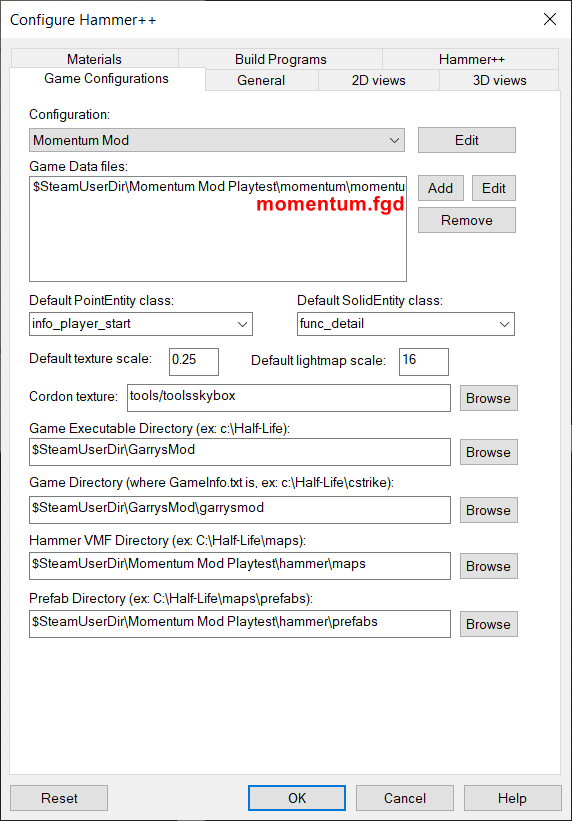
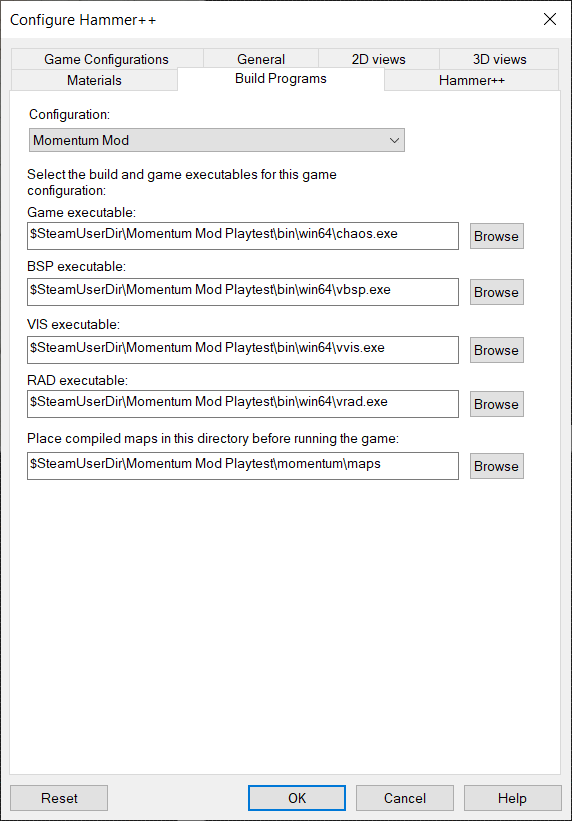
Mounting Games
In order for Hammer++ to load content from the various games that Momentum Mod mounts, follow these steps:
- Open mount.cfg in
GarrysMod\garrysmod\cfg - Add the following content to mount.cfg (adjust the paths accordingly):
"mountcfg"
{
    "cstrike"	"C:\Program Files (x86)\Steam\steamapps\common\Counter-Strike Source\cstrike"
    "tf"	"C:\Program Files (x86)\Steam\steamapps\common\Team Fortress 2\tf"
    "portal"	"C:\Program Files (x86)\Steam\steamapps\common\Portal\portal"
    "portal2"	"C:\Program Files (x86)\Steam\steamapps\common\Portal 2\portal2"
    "momentum"	"C:\Program Files (x86)\Steam\steamapps\common\Momentum Mod Playtest\momentum"
}
Hammer++ for Counter-Strike: Global Offensive
Prerequisites:
- GCFScape
- Hammer++ CS:GO Build
- About 32 GB of disk space (depending on how many games are mounted)
Hammer++ Configuration
- Opt into the CS:GO legacy branch in Steam by right clicking Counter-Strike 2 -> Properties -> Betas -> Select
csgo_legacy - Legacy Version of CS:GO - Install GCFScape and extract the Hammer++ .zip file into your
Counter-Strike Global Offensive\binfolder. - Run hammerplusplus.exe
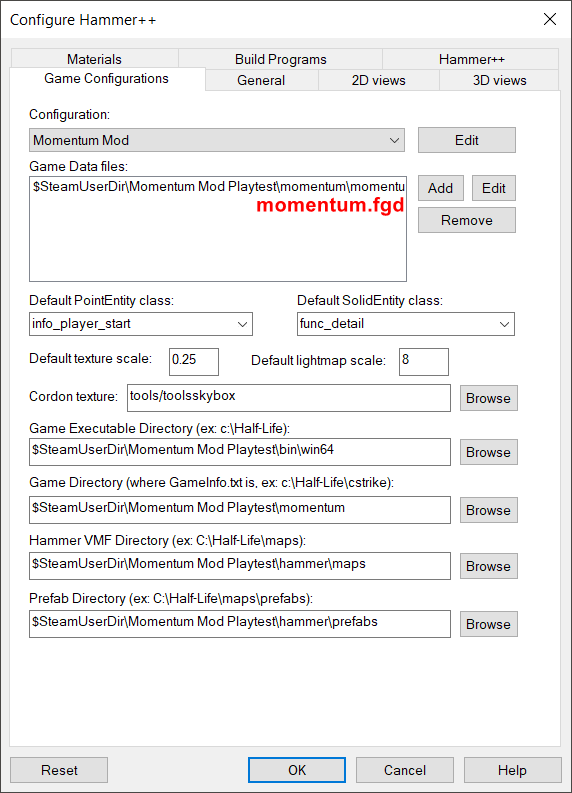
- Copy the following configuration:
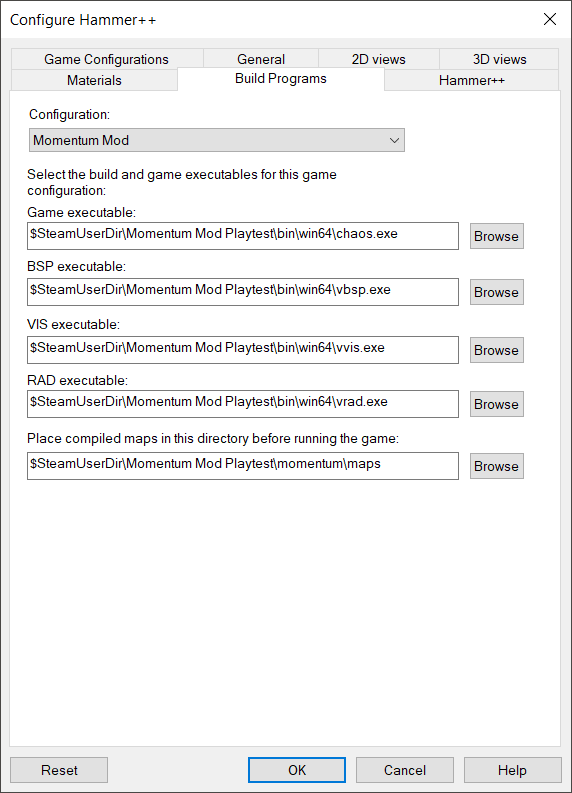
Mounting Games
In order for Hammer++ to load content from the various games that Momentum Mod mounts, follow these steps:
- Extract materials, models, and sounds from .vpk files:
- Extract
Counter-Strike Source\cstrike\cstrike_pak_dir.vpkintoCounter-Strike Global Offensive\csgo\mounted_content\cstrike_content - Extract
Portal 2\portal2\pak01_dir.vpkintoCounter-Strike Global Offensive\csgo\mounted_content\portal2_content - Extract
Team Fortress 2\tf\tf2_misc_dir.vpkandTeam Fortress 2\tf\tf2_textures_dir.vpkintoCounter-Strike Global Offensive\csgo\mounted_content\tf2_content
- Extract
- Mount Momentum Mod content by running this command in a command prompt:
mklink /D "<path to steam games>\Counter-Strike Global Offensive\csgo\mounted_content\momentum_content" "<path to steam games>\Momentum Mod Playtest\momentum" - Open
Momentum Mod Playtest\momentum\gameinfo.txtand copy the following contents into the SearchPaths section:
game        "csgo/pak01_dir.vpk"
game        "csgo/mounted_content/cstrike_content"
game        "csgo/mounted_content/portal2_content"
game        "csgo/mounted_content/tf2_content"
game "csgo/mounted_content/momentum_content"- Open Hammer++ and the content from these games should load now.
If Hammer++ crashes on startup, you may have to delete the particles folders that were extracted from the .vpk files.
Lights.rad Setup
In order to support light emitting textures from Portal 2, copy the contents from Portal 2\portal2\lights.rad and paste them into Counter-Strike Global Offensive\csgo\lights.rad