Note: This guide assumes that you have a basic working knowledge of the hammer editor and the tools used.
Basic Surf Ramps
#
Planning
#
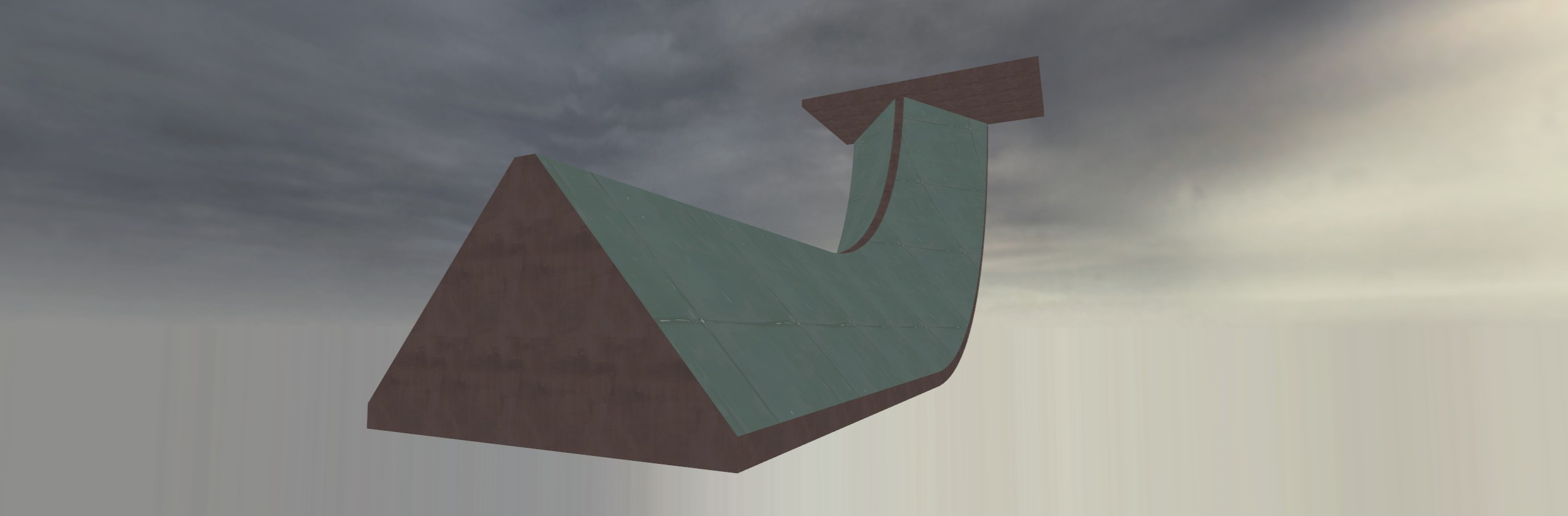
Before you start to create your ramps in hammer, there are a few factors you should consider:
- How steep do I want the ramps to be?
- A ramp that is too steep / wide may be considered awkward to board.
- People tend to use a 5:4 ratio for the dimensions of their ramps
- What size do I want for my ramps?
- People may find themselves sliding off the bottoms of small ramps.
- They may feel like they are going slow on oversized ramps, it is important to find a balance.
- How do I want to detail my ramps?
- Will models be needed to achieve the visual style, or can it be brushes?
These characteristics of your ramps will inevitably be refined through testing, but it is a good idea to start off with a plan for how you want the surf to feel.
Look at different surf maps that you enjoy and try to get an idea of how exactly you want yours to pan out.
...
Config Files
#
Config files are a list of commands to execute (one per line).
A collection of console variables can be found here.
Automatic Configs
#
When a map loads, certain config files from momentum/cfg folder are executed automatically, in specific order.
These 2 configs run on every map load.
| Config |
When it executes |
game.cfg |
Pre-load – runs before map entities are created |
game_postent.cfg |
Post-load – runs after map entities are created |
After them, a gamemode specific config is executed.
...
Two powerups are implemented: Haste and Damage Boost. They can be given or removed with these inputs:
SetHaste (time in seconds)
SetDamageBoost (time in seconds)
If time = 0, the effect will be removed. If time < 0, then the effect will last indefinitely until removed.
There are also powerup entities: momentum_powerup_haste and momentum_powerup_damage_boost. They both take a ResetTime key like the weapon spawner entity. The haste powerup takes a HasteTime key, and the damage boost powerup takes a DamageBoostTime key. They are both specified in seconds the same way as the inputs.
...
Background
#
Momentum Mod ships with a customized build of Hammer (named “Strata Hammer”) which includes some, but not all of Hammer++’s features. Our development has been geared more towards stability than new features, with a focus on porting to Qt for cross platform UI and bug fixing. While Strata Hammer should be perfectly usable (and we appreciate testers), it will be a while until Hammer++ features like accurate lighting preview are fully implemented. If you prefer using Hammer++, that is completely reasonable and this guide should get you set up.
...
As Momentum Mod aims to be a global platform for everyone around the world to enjoy, it only makes sense that we offer support for the various languages players may know. Unfortunately however, nobody on the Momentum Mod team knows every language, so we need your help!
Translating on POEditor
#
To help with bringing Momentum Mod to your language, first join our POEditor project and join any languages with which you are comfortable helping out in.
...
When the game boots, it scans the momentum/custom/ folder for VPK files and subfolders.
For steam users, this will be
Steam/steamapps/common/Momentum Mod/momentum/custom/
under the steam install path.
Each VPK and subfolder is added as a “search custom”, meaning that the files inside them will override the default game’s files.
Using this is recommended over modifying the game’s files, as the custom folder will persist when installing an update or using Steam’s “verify integrity of game files” feature.
...
Before you start
#
Porting maps from Goldsrc to Source is not easy. Depending on the complexity of the map, be prepared to invest anywhere from 3 to 50+ hours into a single port. Prior experience with Valve’s Hammer Editor is helpful, however porting maps is entirely doable without ever having used Hammer before.
This guide was primarily written in July of 2025. There is a small number of people who occasionally work on tools for the GoldSrc porting process, so depending on when you are reading this there may be some new ways to make the process easier. Search the web or ask in the Momentum Mod Discord and you might find something useful.
...
Before you start, you should know that maps with simple geometry work best for porting. Complex geometry can cause invalid solids as vertices tend to shift around if they are off grid, and you will be forced to recreate a lot of the brushes manually. Patches and props cannot be ported across either, so choose maps without those or you will have to spend a lot of time manually replacing them in Hammer.
...

This guide covers how to make a custom HUD menu, such as the saveloc or ruler menus.
Note that this does not cover how to make custom Panorama menus more generally, just Static HUD menus, which are controlled by slot0-9 keys and mimick the VGUI panels commonly used on game servers for e.g. !nominate, !votemap.
HUD menus are a nice way to add many commands/cvars into a single menu.
There are a few HUD menus that ship with the game:
...
Ammo System
#
All Defrag weapons, the RJ Rocket Launcher, the Sticky Bomb Launcher, and Concs can be controlled with separate ammo types.
By default players have infinite ammo.
Additionally, an ammo limit can be set that doesn’t allow the player to have more than a certain amount.
By default, the player has a limit of 200 on the maximum amount of ammo they can carry of any type.
This can be changed with the SetAmmoLimit input, where a limit of -1 means no limit.
The ammo limit does not prevent the player from carrying infinite ammo, it only applies when the player’s ammo is finite.
Pickup Entities
#
In order to create an ammo pickup use momentum_pickup_ammo entity.
The key AmmoName controls the type of ammo. It takes a string which is one of the names in the table below.
The entity also takes a PickupAmmo key which controls how much ammo the player gets.
momentum_weapon_spawner entity can also give ammo on pickup, controlled by the PickupAmmo key.
...